Appearance
Suppression Files (Larger than 28 MB)
Suppression File Requirements Overview.
SUPPRESSION FILE LAYOUT REQUIREMENTS
- Required format is a .txt file
- We accept pipe or tab delimiters, but you must choose one and be consistent with all future file submissions otherwise we cannot guarantee that your file will convert.
- Any file received will be used as a complete replacement for files currently in production.
- File naming convention must follow this specific naming convention: ClientName_Date_Suppress
PLEASE NOTE: SUPPRESSION = if we match a record you supply, we will suppress/exclude that record.
- To ensure we capture every suppression/selection you are encouraged to include all known names and addresses for a given customer record (i.e. bill to / ship to records should be broken out on separate rows).
- A header row with Field Names is required.
- Include all fields in your file, whether populated with data or not.
- Remove all data outside the 50 States of United States Territories. Any records provided outside of the United States will be dropped during processing.
- All records will be verified and standardized using Zip4. Records that do not convert to Zip4 and pass USPS address validation checks will be dropped.
Suppression File Layout

sFTP Host Information
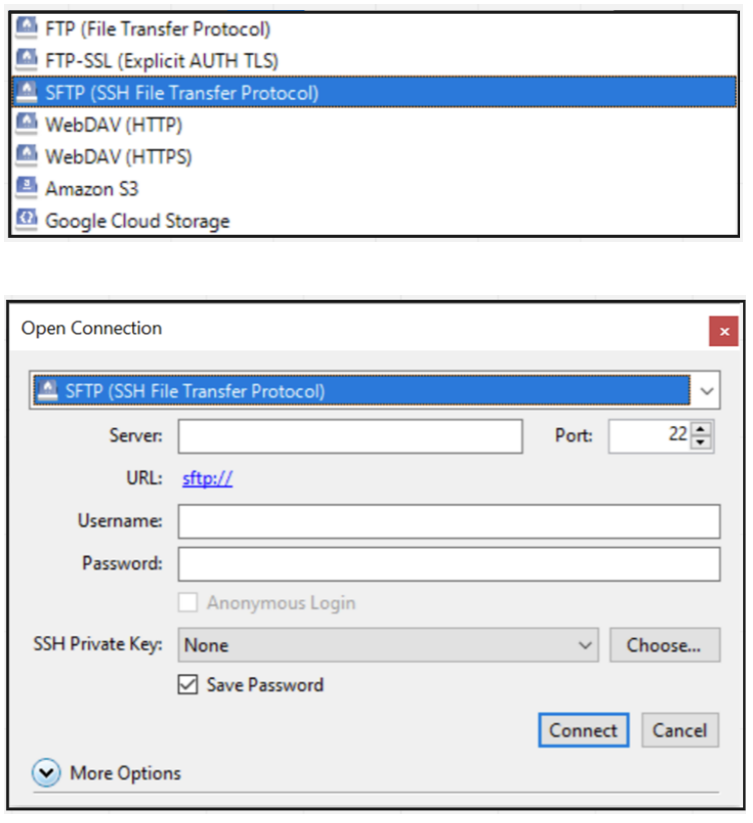
The NaviStone sFTP requires the use of a file transfer program. (e.g. Filezilla, MoveIT or Cyberduck)
Host: 		sftp03.navistone.com
Port: 		22
Username: 	<Your Email Address> (the email you used when signing up for NaviStone)
Password: <Your password> (the password you used when signing up for NaviStone)Important: please ensure that SFTP is selected from the dropdown menu.
Once signed in, you should see a folder with your domain name in which your suppression file should be uploaded too. Please upload the file into folder labeled hf-incoming.