
Appearance
The Conversion Tag
UNDERSTANDING HOW PARAMETERS WORK IN THE “MGX OBJECT” PORTION OF THE NAVISTONE CONVERSION TAG
You will notice that in the MGX Object portion of the NaviStone script, we provide you with 4 different parameters to populate...
These parameters give you the ability to send data into the NaviStone platform to power results reporting.
Below is additional details about how to manage each of these parameters when you are setting up and/or maintaining the NaviStone tag.
AccessKey
This parameter must be populated, set within single quotes, and the value to place here is the AccessKey provided to you by the NaviStone platform tagging instructions. You can always find this value by going to this page from the domain dashboard
https://platform.navistone.com/tag-details
The AccessKey value is unique to each one of your domains in the NaviStone platform, and ensures that any data being exchanged between your domain and the Platform remains unique to your account.
Label
In the case of the Conversion Tag, this parameter must be populated, set within single quotes, and the value to place here is the word ‘Conversion’.
NOTE: be sure the word
Conversionis encased in single quotes.
‘Conversion’, is valid syntax.Conversion, is not valid syntax and may result in unintended results.
**By populating this parameter and including it in this object, you are letting our system know that the user action that fired the Conversion Tag script was an action that you wish to have counted in NaviStone’s automated results reporting system.
Examples of such an action might be the successful purchase of a good or service, or the completion of a specific form.
It is up to you to decide what constitutes an action you want to measure within the context of your marketing campaign strategy.
OrderId
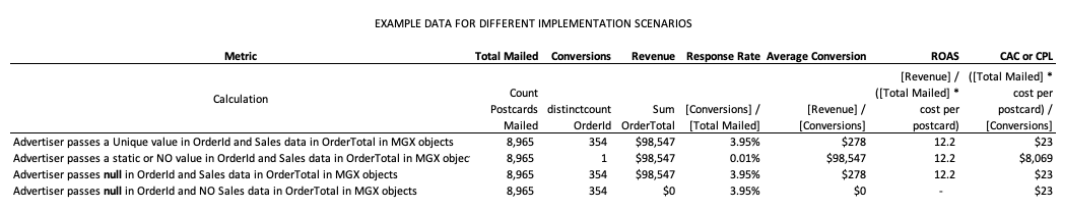
The NaviStone results reporting system determines the number of unique Conversions by performing a distinct count of OrderId.
The OrderId parameter gives you a method to push distinct alpha or numeric values into the platform.
This is an important component of our results reporting system.
Examples of distinct values you may choose to push into the platform might include order or invoice id, or a GUID generated by your website platform when a user acts on the site.
NOTE: You may also decide not to populate this parameter with a unique value. In this case it is imperative that you pass a value of
null, without any quotes.
null, is valid syntax.‘null’is not valid syntax.
If you implement this method with valid syntax, the NaviStone platform will generate a random and unique GUID when recording the Conversion in our metrics platform.
If you do NOT populate this parameter with a unique value or null, the distinct count function will always produce a result of 1 conversion, no matter how many Conversion events have been recorded.
The impact of this is that when you view your campaign performance metrics, KPI’s calculations that are based on the number of Conversions will not be usable.
Such KPIs include Response Rate, Cost per Conversion, and Cost per Lead.
OrderTotal
The OrderTotal parameter gives you a method to push sales data, if available, into the NaviStone platform for inclusion in results reporting key metrics such as total sales generated by your campaigns, average order amount, return on ad spend, etc.
NOTE: You may also decide not to populate this parameter with a value. In this case it is imperative that you pass a value of
null, without any quotes.
null, is valid syntax.‘null’is not valid syntax.
If you do not pass any sales data, key metrics in results reporting where sales data is part of the calculation will have a message indicating that no data are available for that metric. Such KPIs are Revenue, Return on Ad Spend (ROAS), and Average Order.
Example Data For Different Implementation Scenarios
 {target="`blank"}